You sign in to the Vault APIs with OAuth 2.0 and OpenID Connect, through Keycloak. You get an access token from the token endpoint, and you send it in the Authorization header of every call:
Authorization: Bearer <access-token>
The token also tells the archive which tenant you work in, and which roles your client has. Your roles decide which endpoints you can call.
Before you begin
Docbyte gives you these values when you start:
-
account,environment, andtenant: the parts of your Keycloak URLs. -
client_id: the ID of your client in Keycloak. -
client_secret: for the client credentials flow only. -
Your roles: Docbyte assigns them to your client. To see what each one allows, go to What each role allows.
For the authorization code flow, Docbyte also needs these from you:
-
The exact redirect URIs of your app. Keycloak rejects any other redirect URI.
-
The web origins of your app, if it runs in the browser.
Your token endpoint and your authorize endpoint are:
https://keycloak.{account}.{environment}.docbyte.cloud/realms/{tenant}/protocol/openid-connect/token
https://keycloak.{account}.{environment}.docbyte.cloud/realms/{tenant}/protocol/openid-connect/auth
Pick a flow
-
Client credentials: for a backend integration that calls the API on its own, without a user.
-
Authorization code: for an app that calls the API for a user who signs in.
Get a token with client credentials
-
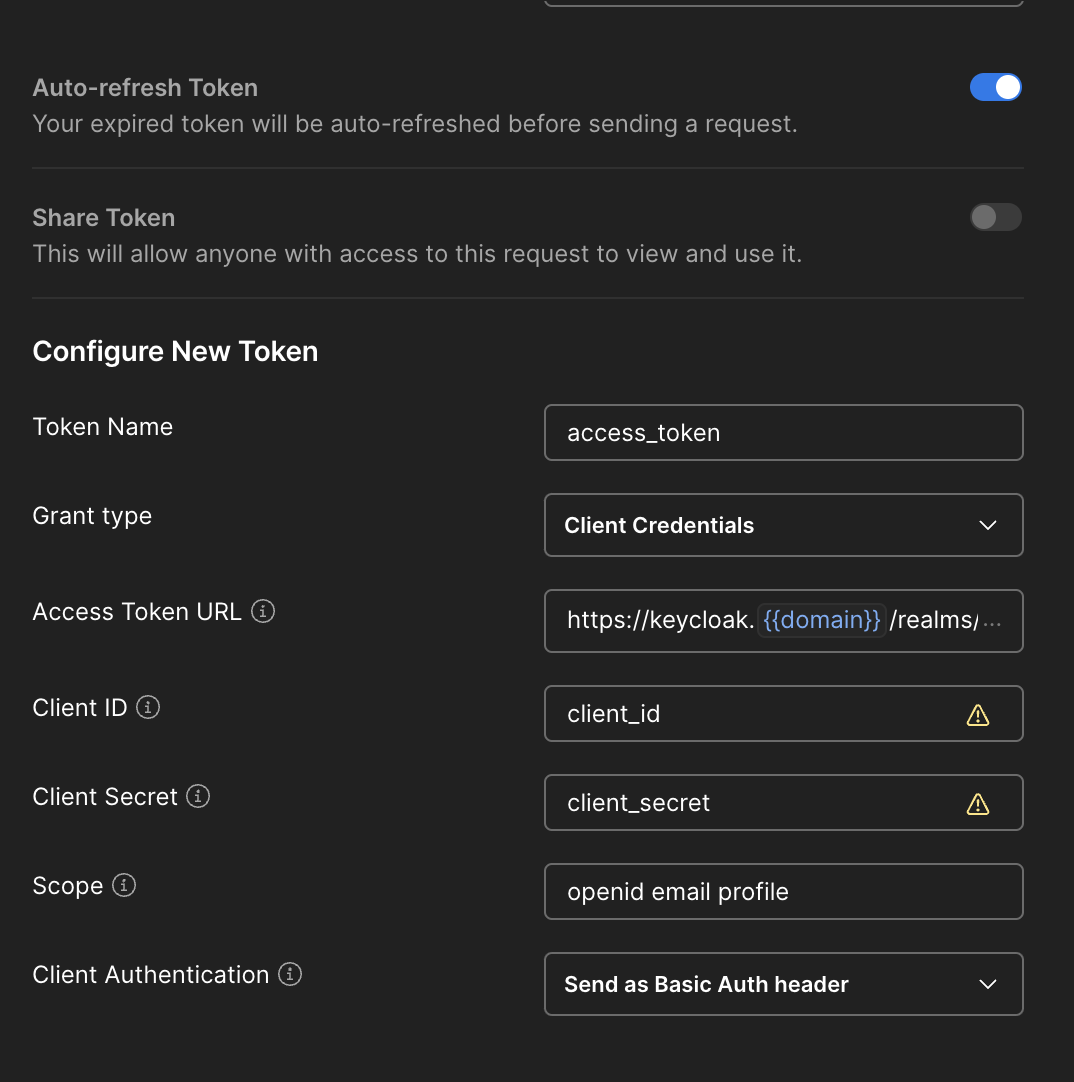
Send your client ID and secret to the token endpoint:
Bashcurl -X POST "$TOKEN_URL" \ -d grant_type=client_credentials \ -d client_id="$CLIENT_ID" \ -d client_secret="$CLIENT_SECRET" -
Take the
access_tokenfrom the response:JSON{ "access_token": "eyJhbGciOiJSUzI1NiJ9.eyJ0ZW5hbnQiOiJhY21lIn0.c2lnbmF0dXJl", "expires_in": 300, "token_type": "Bearer" }
An access token lasts 300 seconds. This flow gives you no refresh token, so request a new access token before the old one expires.
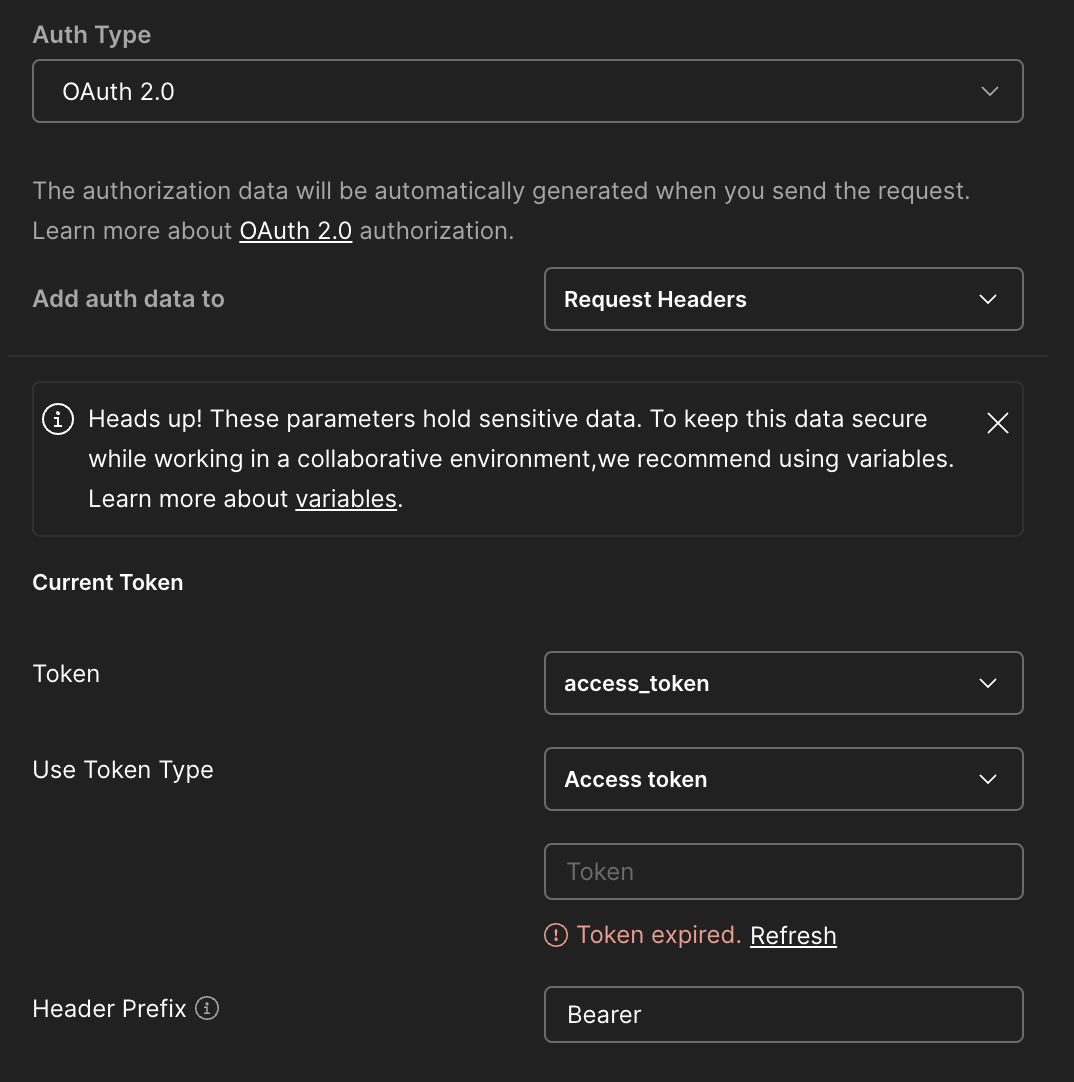
Example in Postman
Get a token with the authorization code flow
-
Send the user to the authorize endpoint:
GET {authorize-endpoint}?response_type=code&client_id={client_id}&redirect_uri={redirect_uri}&scope=openid -
The user signs in. Keycloak then sends the user back to your redirect URI, with a
codequery parameter. -
Exchange the code for tokens at the token endpoint:
Bashcurl -X POST "$TOKEN_URL" \ -d grant_type=authorization_code \ -d client_id="$CLIENT_ID" \ -d code="$CODE" \ -d redirect_uri="$REDIRECT_URI"
The response holds an access_token, a refresh_token, and an id_token. The access token lasts 300 seconds, and the refresh token lasts 1,800 seconds. To get a new access token without asking the user to sign in again, send the refresh token:
curl -X POST "$TOKEN_URL" \
  -d grant_type=refresh_token \
  -d client_id="$CLIENT_ID" \
  -d refresh_token="$REFRESH_TOKEN"
Call the API
This call lists the tenants that your client can work in, and it works with any role:
curl "https://{base-url}/v2/archive/tenants" \
  -H "Authorization: Bearer $ACCESS_TOKEN"
{
  "items": [
    { "id": "acme", "label": "Acme Archive", "current": true }
  ]
}
The archive works in the tenant of your token. If your client can work in more than one tenant, you can pick another one with the tenant header, as Common headers shows.
What each role allows
Your roles are in your token, in the resource_access.preserve_api.roles claim. Each endpoint page says which role it needs.
|
Role |
What it allows |
APIs |
|---|---|---|
|
|
Add packages to the archive, and remove a SIP. |
Ingest |
|
|
List the fields that you can search on. |
Dissemination |
|
|
Manage packages and the archive's setup, search with structured criteria, and search for users and groups. |
Most APIs |
|
|
Manage retention rules and apply them to packages, search for users and groups, and do everything that |
Retention, Archive, Admin |
|
|
Review retention: read rules and deletion lists, review a deletion list, manage legal holds, and extend a package's retention. |
Retention, Archive |
|
|
Approve or reject a package that waits for a QA review. Docbyte sets up the matching QA permission in the archive together with the role. |
Archive |
|
|
Create, list, and change users, and send invitations. |
Admin |
The other endpoints don't need a specific role, for example search, retrieving a package, browsing the file plan, and following an ingest.
Note: The archive also checks your client's permissions on each package. So a call can be refused for one package, and a list leaves out the packages that your client can't see.
Without the role that an endpoint needs, a call gets a 403 error with the reason PERMISSION_DENIED. To get a role, ask Docbyte.
When authentication fails
A call without a valid token gets a 401 error. To handle it, go to Errors.