Docbyte Vault 26.3, released on 29 October 2026, makes everyday archive work easier and gives you proof you can show an auditor. These are the highlights:
Highlights
-
🖥️ Vault Admin 2.0 is a redesigned, accessible interface for your everyday archiving tasks, and meets the WCAG 2.2 level AA guidelines.
-
🔏 Sealed integrity reports give you proof that your records are unchanged, ready to hand to an auditor.
-
⚖️ A new overview shows every record that’s under legal hold.
-
🗂️ You can now define your own metadata schemas, with versioning and an approval step, so your archive captures the information your organisation needs.
-
🧪 A ready-made Vendor Validation Package shortens computer system validation (CSV) in life sciences, for pharmaceutical and biotech companies, clinical research organisations and laboratories.
-
🤖 LLM integration in Vault Review finds client and contract references in incoming documents and shows the reviewer its reasoning.
-
🔌 An expanded REST API and a new MCP server let you connect Docbyte Vault to the rest of your systems and to Claude.
New features
Vault Admin 2.0
Vault Admin 2.0 is the new look of the Vault Admin you already know. Everything you did before is still there, and more.
What's improved
-
The new UI makes it much easier to upload a set of files and let Docbyte Vault build the SIP package for you, so you don’t need a separate tool.
-
You switch between search configurations at the top of the search screen instead of in the main menu. Filters show how many packages match each value, and your results stay next to the selected package.
-
Ingest & Monitor lets you upload packages, follow every ingest from one screen and see why an ingest failed. With ingest review switched on, every package needs approval before it enters the archive.
-
When you open a package from a deletion list, the list stays next to it. The audit trail records each status change of a deletion list and when a package was added to it.
-
Collections are now called Package Sets, because "collection" can have different meanings within the archiving community. You can add packages to a Package Set from your search results or from the package itself.
-
A query builder replaces SQL for choosing the packages a preservation action or report covers. You can run an action on all matching packages at once and see the result for each one.
-
The menu shows text labels grouped by task, action buttons have tooltips, and tables are easier to read.
-
Vault Admin 2.0 meets the WCAG 2.2 level AA accessibility guidelines with better contrast for text, buttons and charts, including for users with low vision.
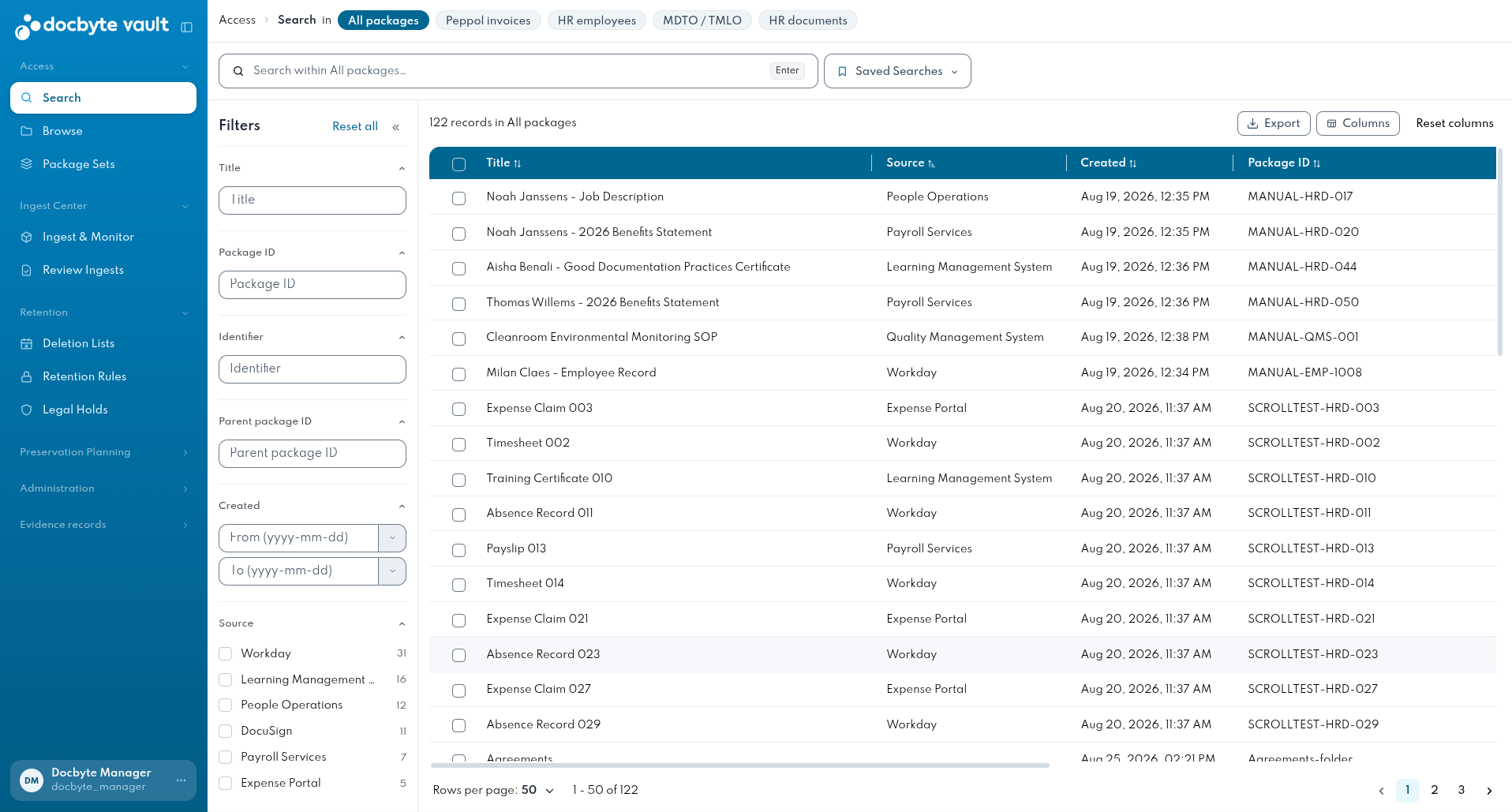
New in Vault Admin 2.0
-
The new Review Ingests screen lets you approve every ingest before its packages enter the archive, and take out a package that shouldn't be there.
-
A new overview shows everything under legal hold, and which records are protected from deletion.
-
You can save a search with its filters and open it again in one click. To share a search, send the URL: your colleague sees the same results, within their own access rights.
-
Preservation actions and reports can run on a recurring schedule.
-
You can save a package selection for preservation actions and reuse it next time.
-
Users who work across several tenants can switch tenants from the profile menu.
Benefits
-
Searching, working through a deletion list and picking packages for a preservation action all happen on one screen.
-
Search, deletion lists and Package Sets share the same layout, with a list and the selected item next to it.
-
Clear error messages, tooltips and an optional approval step help you catch a wrong package before it enters the archive.
-
Everything in Vault Admin is also available through the API, so you can automate repetitive work.
When you upgrade to Docbyte Vault 26.3, all users get Vault Admin 2.0 automatically. Vault Admin 1.0 is no longer available.
Integrity reports: proof that your records are unchanged
Auditors, inspectors and courts can ask you to prove that an archived record has not been altered. Docbyte Vault can now give you that proof in a single report. For organisations that offer qualified preservation or archiving services, the European eIDAS 2 regulation (electronic identification, authentication and trust services) makes this proof a formal requirement.
What's new
-
Open a package and request its integrity report. Docbyte Vault checks that nothing has changed since the package was archived, and confirms that any signatures or seals on its documents are still valid. You get a result for every check and an overall status for the package.
-
The report is a PDF with an electronic seal and a qualified timestamp, both applied by independent trust service providers. Anyone who receives it can check that it is authentic and unchanged, without needing access to your archive.
-
For situations that need the highest legal weight, request a qualified report. It carries a qualified electronic seal, which EU law presumes to be authentic and unchanged. For everyday checks, a standard report with an advanced electronic seal is enough.
Benefits
-
Hand over one sealed document instead of gathering screenshots and exports from different screens.
-
If you offer a qualified service, the integrity report is built to meet eIDAS 2 expectations, with no custom development on your side.
Vendor Validation Package for life sciences
Validating an archive system under GxP (the good practice guidelines for regulated life sciences, such as good manufacturing, laboratory and clinical practice) usually means months of documentation work by the customer's quality assurance (QA) and IT teams. With 26.3, Docbyte ships a Vendor Validation Package (VVP): the vendor-side documentation and evidence a validation team normally has to request, chase or rebuild.
What's included in the VVP
-
Introduction, scope and positioning, with an index to all deliverables
-
Docbyte Vault requirements baseline
-
Vendor-side risk register
-
Customer intended-use risk template for 21 CFR Part 11 (Title 21 of the US Code of Federal Regulations, Part 11, which covers electronic records and electronic signatures)
-
Evidence sets at organisation level and at Docbyte Vault level, including executed test evidence from a reference environment
-
Docbyte Vault design specification
-
Ready-to-execute operational qualification (OQ) test scripts
-
Validation templates: user requirements specification (URS), traceability matrix, risk assessment and release impact assessment
-
A release validation package and a sample audit pack for a representative archival package
Benefits
-
Your computer system validation (CSV) starts from documented vendor requirements, risks and test evidence instead of from scratch.
-
You can run the OQ test scripts in your own environment instead of writing and reviewing your own test protocols.
-
The risk template is structured for 21 CFR Part 11, so your QA team adapts it to your intended use rather than writing it.
-
Validation evidence is produced as part of the Docbyte Vault release cycle, so after an upgrade you revalidate against the release validation package instead of repeating the full validation.
Custom metadata schemas
Every organisation records different information about its documents. Docbyte Vault already supported custom metadata schemas. Now you can set them up and change them yourself, without a change request for the Docbyte team.
What's new
-
You can create custom metadata schemas for your archive.
-
A new or changed schema starts as a draft. It only goes live once it has been approved, so changes are checked before they affect your archive.
-
Every approved change creates a new version of the schema. Earlier versions stay available, and metadata is never deleted, so the metadata recorded under a previous version can always be retrieved.
-
Metadata forms and views follow your schema automatically.
Benefits
-
Your document types get the fields your teams actually use.
-
Forms follow the schema, so metadata is consistent from the moment a document is archived.
-
A schema change only takes effect once it has been approved, and it never overwrites the metadata you already hold.
LLM integration in Vault Review
Classic Machine Learning models lose accuracy when document formats and wording change. Retraining needs consistently labelled data, which most mailrooms don’t have. So we’ve added an LLM as a reasoning layer on top of the existing IDP flow. IDP still handles capture, validation and routing. The LLM adds interpretation.
What’s new
-
The LLM extracts client, prospect and contract references from incoming documents.
-
Vault Review shows the model’s reasoning next to the result, so reviewers see why it was chosen.
-
A reference that doesn’t validate goes to manual review instead of being forced into a plausible match.
Benefits
-
In a mailroom pilot, document-type accuracy went from 40% to 80%, without fine-tuning.
-
Fewer documents need manual correction.
Read the blog post for a deep-dive.
Connect your systems and AI assistants
The Docbyte Vault REST API has been expanded, and Docbyte Vault now also offers an MCP server (Model Context Protocol, the open standard AI assistants use to connect to other applications). You can connect Claude or any other tool supporting MCP to Docbyte Vault and let it search and summarise archived content for you.
What's new
-
The REST API has been expanded, so everything you do in Vault Admin can now also be automated: ingest with review and approval, retention and legal holds, integrity reports and audit trails, preservation actions, and user, permission and notification management. The changes are backwards compatible, so existing integrations keep working.
-
Your AI assistant can list your search configurations, search on metadata such as dates, titles, creators or document type, browse the file plan and show the metadata of a package.
-
Built-in prompts cover common tasks, such as finding a document, searching within a date range and summarising what's in your archive.
How it works: an example
A user asks: "Find the vendor contract for ACME Corp from last month."
-
Claude Code picks the right search configuration.
-
It searches on document type and creation date.
-
It answers with the number of matching dossiers and a list with their title, creation date and creator.
What you can use it for
-
Find a document by person, topic or type without building a search.
-
Get a quick overview of what's in your archive, for example how many packages there are per creator or document type.
-
Narrow down a result step by step, for example "only show the ones from HR".
Benefits
-
Ask for what you need in plain language instead of building a search.
-
Access control stays exactly as you have set it up, because the assistant acts as the user.
Good to know
-
Existing integrations continue working. The REST API has been expanded without breaking changes, so current integrations remain functional after the upgrade. See the API Reference.
-
The Docbyte Vault MCP server works with any MCP-compatible AI assistant. We validated it against Claude Code as the reference client.
-
The AI assistant signs in with each user’s own Docbyte Vault account, so it only sees what that user is allowed to see.
-
The AI assistant reads metadata only. It doesn’t open your files, and it can’t upload, change or delete anything in the archive.
-
The metadata the AI assistant reads is sent to the provider of the model you use, and handled under the terms of your agreement with that provider. Check with your organisation which archive data may be used with an AI assistant.
-
AI assistants summarise results in their own words and can make mistakes. For decisions that matter, such as legal holds or deletion, check the packages in Docbyte Vault.
How to
Small Improvements
Ingest
-
Ingest performance and stability has been improved when working with larger volumes.
Retention
-
When a retention period ends, a retention rule can now also keep the package as it is, or transfer it to another tenant.
-
If you choose to keep the package, nothing happens to it, but the end of its retention period is still recorded in the audit trail.
-
A transfer to another tenant at the end of retention works the same way as a manual transfer. When you set up the rule, you choose from the tenants you have access to.
-
The Records reviewer role now has access to the Extend retention action.
-
The deletion list report has been extended for compatibility with CEN/TS 18170.
Reporting
-
The reporting dashboard and the usage report now also show your effective used storage.
Security
-
Sign-in and the Docbyte Vault services have been further hardened.
Bug fixes
-
Package creation dates and titles stay correct when metadata is processed again, and relations between packages are processed correctly.
-
Email attachment names now display correctly in PDF copies.
-
Files in unusual or unrecognised formats no longer stop preservation, and more file types are recognised.
-
Retention rules no longer fail when a metadata field is missing.
-
Package status is shown in both the interface and the API.
How to get the update
Docbyte upgrades your environment for you. You don't need to install anything.
-
Your Docbyte Customer Success Manager will contact you to plan the upgrade to 26.3.
-
The upgrade is carried out in stages: Docbyte first upgrades and tests the release in your test environment.
-
Your team then validates the update during user acceptance testing (UAT), and once approved, Docbyte upgrades your production environment (PRD) at an agreed time.
What to expect when you upgrade
-
When the upgrade is done, all users get Vault Admin 2.0 automatically. Vault Admin 1.0 is no longer available.
-
Your existing integrations keep working, because the REST API changes are backwards compatible.
-
Ingest review stays switched off until you request to switch it on.